What is Model Context Protocol (MCP)?
Introduction
What Problem Does MCP Solve?
Large Language Models (LLMs) excel at understanding and generating text. However, when used in isolation, they are fundamentally limited: their knowledge is frozen at training time, and their capabilities are restricted to producing text rather than interacting with the external world. To be useful in real-world applications, including sending emails, querying databases, executing code, or acting as autonomous assistants, LLMs must be able to interact with external tools, services, and data sources.
The Model Context Protocol (MCP) is the bridge that connects LLMs to knowledge and actions in the external world. Introduced by Anthropic in November 2024, it provides a standardized way to connect models to tools and data at scale, enabling a shift from systems that merely answer questions based on training data to truly capable AI agents.
The Integration Problem
Before MCP, enabling these capabilities meant each AI application had to be manually integrated with every external tool it wanted to use, conforming to that tool’s specific API and conventions. As a result, developers faced an integration problem: for AI applications and tools, custom integrations were required. This approach quickly became expensive, fragile, and difficult to scale as both applications and tools proliferated.
With MCP, an AI application connects to MCP once, and each tool or service connects to MCP once. MCP sits in the middle, defining a shared way for applications to request capabilities and for tools to respond. This common communication layer reduces the problem from to , making AI systems far easier to build and extend.
Described by the developers at Anthropic as a “USB-C port for AI applications,” MCP simply provides a standardized API, enabling AI systems to more easily connect to real-world tools and services.
The Technology
Architecture
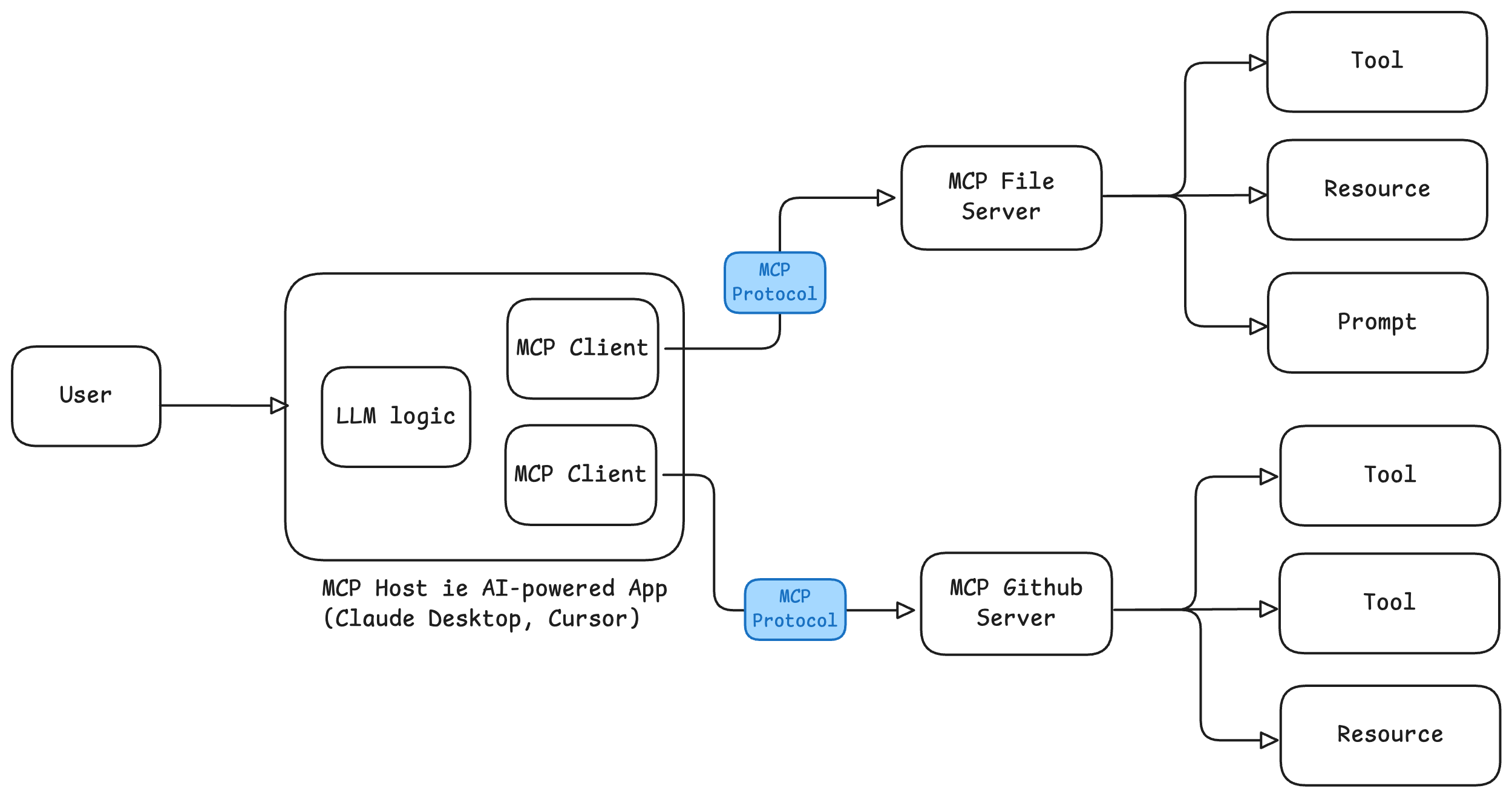
MCP follows a server–client architecture and consists of the following components:
MCP Host
The AI application that users interact with (e.g., Claude Desktop, VSCode, Cursor). It implements an MCP Client and orchestrates the workflow from user requests, to LLM processing, to calling the relevant tools for each task.
MCP Client
The MCP implementation layer inside the host application. Each MCP client instance maintains a stateful 1:1 connection to a single MCP server. The client implements the MCP protocol, acting as an intermediary between the host and server, and handling all protocol-specific details such as message formats, state, and lifecycle.
MCP Server
An external program that exposes a set of capabilities (tools, resources, prompts) in a standard format that MCP clients can discover. For example, an LLM cannot access your files directly, but an MCP filesystem server can make them available so the LLM can read and manipulate them. Note that an MCP Server can execute locally (on the same machine as the host) or remotely, more info on this later.
Question: If an MCP client can only connect to one server at a time, can it only use capabilities from that server?
No. The host creates one MCP client implementation (the code) but can create multiple instances (separate session/socket objects), with each instance maintaining a single stateful connection to a dedicated server. For example, Claude Desktop acts as an MCP Host. When Claude establishes a connection to an MCP server, such as a local filesystem server, the Claude Desktop runtime instantiates an MCP client object that maintains the connection to the local filsystem server. When Claude subsequently connects to another MCP server, such as the Git MCP server, the Claude runtime instantiates an additional MCP client object to maintain this connection. This allows the host to access capabilities from multiple servers simultaneously.
Capabilities
Let’s use the example of a coding assistant to understand MCP capabilities/primitives. MCP Servers can expose three different types of capabilities: tools, resources and prompts.
-
Tools
This is the most common way an MCP server exposes functionality. Tools are executable functions, such as API calls or data manipulation operations. In a coding assistant, example tools might include , , and .
- Control: The LLM controls when to call a tool, how many times to call it, and in what order. Because this control is delegated to the model, the resulting behavior is non-deterministic. Even with the same prompt and access to the same tools, the LLM may produce slightly different outputs across runs.
-
Resources
Resources provide read-only access to data sources that the model can use as additional context. In a coding assistant, this might include files such as a , database schemas, file contents, etc. Each resource is uniquely identified by a URI, and the client can subscribe to resource changes.
Question: If a tool is an executable function, couldn’t we just define a tool that returns data? What is the purpose of a resource?
The key distinction is who controls access. Tools are model-driven, while resources are host/application-driven. In the case of tools, the LLM decides when and how to invoke tools. In comparison, the LLM never automatically retrieves resources. Instead, the host application (often with the help of the user) determines which resources are relevant and explicitly provides them to the model as context.
This can still feel abstract, so let’s walk through an example. Given a user prompt like “Fix the bug where users can submit empty usernames,” a host application can select which resources to include as additional context for the LLM by:
- Asking the user, “Which resources do you want me to look at?” and present a list of available resources. The user can then select which files to include.
- Passing all raw available resources to the LLM
- Selecting a subset of data from available resources using embeddings or keyword search
The host then passes these resources to the model as additional context. With this context available, the model can use tools such as and to fix the bug.
-
Prompts
Prompts are reusable, predefined templates that the MCP Server exposes to the client to guide interactions between the user, the AI model, and the server.
- Control: Prompts are user-controlled. They are triggered by user-initiated commands such as through /slash commands or user-selectable options in the UI. In a coding assistant, for example, these might include actions like “Add test cases” or “Generate a code review.”
Each capability type has associated methods for discovery (), and retrieval (), and in the the case of tools, execution (). For example, MCP Clients can discover available resources using .
Sampling
Sampling is a capability that MCP clients can expose. It enables the server to request that the client's AI application perform an LLM action. For example, the server might want to use the LLM to review code or processed data. This allows MCP server authors to use LLMs while staying model-independent.
- Control: Sampling is server-initiated but requires the client/host to facilitate. The MCP client can review or modify the server’s request before sampling from the LLM and returning the results to the server.
Question: This sounds like an API wrapper. So is MCP just a REST API wrapper?
-
There are some similarities. Both use a client–server architecture and provide a standard abstraction layer, allowing systems to avoid dealing with low-level details and simplifying integration.
-
The key difference is that MCP is designed specifically with the nuances of AI applications in mind. Perhaps most notably, dynamic self-discovery is built in. An AI application can ask an MCP server what capabilities it exposes and receive a structured description of the actions and data available. The application can then decide which tools or resources to use to accomplish a given task.
REST APIs do not offer an equivalent discovery mechanism. Instead, applications must already know which capabilities each endpoint provides and typically require manual code changes when the API evolves.
-
Sampling is another MCP-specific capability. It enables two-way communication between an LLM and an MCP server, allowing the server to incorporate information generated by the model itself as part of its execution.
We begin with a high-level diagram of the architecture, which we will expand with additional details later in the article.
The Communication Flow
To make the MCP workflow more concrete, consider an end-to-end example of a coding assistant.
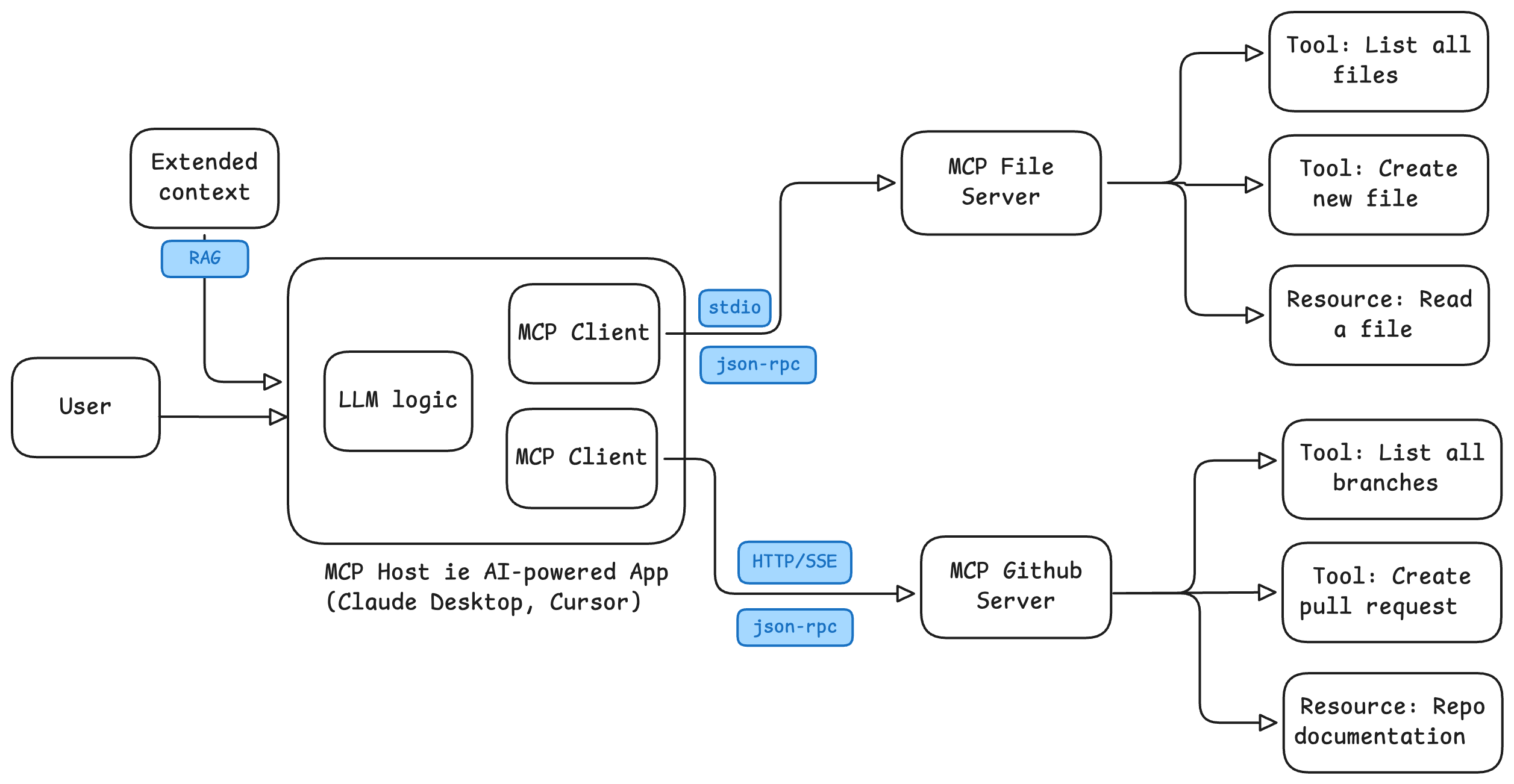
- Initialization: The host AI application (for example, Claude Desktop or VSCode) starts and launches a dedicated MCP Client to connect to each available MCP Server. At this point, each client sends an request to its server, and they exchange information about supported protocol versions and what capabilities they support (for example, some servers may not support resources).
Question: How does the MCP host know which MCP Servers are available? MCP hosts use configuration files, which define which servers are available and how to connect to them. A configuration file may look something like this.
{
  "servers": [
    {
      "name": "File Explorer",
      "transport": {
        "type": "stdio",
        "command": "python",
        "args": ["/path/to/file_explorer_server.py"]
      }
    },
    {
      "name": "Github Remote API Server",
      "transport": {
        "type": "sse",
        "url": "https://github.com/mcp-server"
      }
    }
  ]
}
-
Discovery: The Client requests information about available capabilities and the Server responds with a list of available capabilities. For example, the client can use to discover available tools. This dynamic discovery is a key feature of MCP. It allows clients to understand the capabilities of any server they connect to, without relying on hardcoded tools.
The server may respond with with:
- Tools, such as , , and with descriptions of each tool
- Resources, such as a read-only or documents describing how input validation is typically implemented in the codebase
-
Host Processing: The Host application processes the discovered capabilities. For example, the application combines all available tools from all connected servers into a unified tool registry that the language model can access. This allows the LLM to understand what actions it can perform and automatically generates the appropriate tool calls during conversations. It can also present prompts directly to the user at this stage.
-
User Interaction: A user asks:
Add input validation in so that email addresses are properly checked.
- Capability Invocation: The LLM reasons about what tools it will need. For example, it needs the tool to retrieve . At this point, the host intercepts the tool call, directs the MCP client to route it to the appropriate MCP server, executes the tool call using , and returns the results back to the LLM as part of the conversation flow, enabling the LLM to access real-time data and perform actions in the Once the modifications are determined, the client invokes to apply the validation logic.
- Server Execution: The MCP Server executes the requested functionality and after applying the code changes, it sends the updated file and execution status back to the MCP Client.
- Result Integration: The Client relays these results back to the host application, which incorporates them into the context for the LLM or presents a summary of the changes directly to the user.
The Communication Protocol
Message Format
MCP uses the Json-RPC 2.0 protocol as the message format between the client and server. It defines 3 types of messages:
-
Requests (client-> server)
- Request message includes: , to invoke, and any
-
Responses (server->client, in response to a request)
- Response message includes: same as corresponding request, on success or on failure
-
Notifications (usually server->client)
- One-way messages to provide updates or notifications about events
-
Example request for our coding assistant application:
{
  "jsonrpc": "2.0",
  "id": 1,
  "method": "tools/call",
  "params": {
    "name": "update_file",
    "arguments": {
      "path": "src/App.tsx",
      "content": "export default function App() { return <div>Hello World</div>; }"
    }
  }
}
- Example success response:
{
  "jsonrpc": "2.0",
  "id": 1,
  "result": {
    "status": "success",
    "message": "File updated successfully",
    "path": "src/App.tsx"
  }
}
Transport Mechanisms
While JSON-RPC defines the message format, transport mechanisms determine how messages are actually sent between the client and server. MCP supports two transport mechanisms:
-
Stdio (standard input/output):
- Used when the client and server run on the same machine, with the server launched as a subprocess inside the host.
- The server receives requests via stdin, and the client reads responses via stdout.
- Use cases: file system access, running local scripts.
-
HTTP + SSE (Server-Sent Events) / Streamable HTTP:
- Used when the client and server may be on different machines, communicating over HTTP. SSE allows the server to push updates to the client, but requires the server to remain continuously running with a long-lived connection.
- SSE is incompatible with serverless platforms like AWS Lambda, which expect stateless connections and automatic shutdown after a response.
- To address this, MCP introduced Streamable HTTP in early 2025. This allows the server to dynamically upgrade to an SSE connection for long-running operations, enabling continuous real-time streaming while remaining compatible with serverless environments.
- Use cases: accessing remote APIs, cloud services.
Putting it All Together
Continuing with the example of the coding assistant, let's see how all the different parts we learned about come together:
References
- The MCP course from Hugging Face was built in partnership with Anthropic.
- The MCP Docs, in particular the Architecture overview section
- A Beginner's Guide to Visually Understanding MCP Architecture breaks down MCP architecture in an intuitive way.